
Artificial Intelligence is deeply impressive, but it has its limitations. Therefore, there are some good practices that will greatly increase the likelihood of success when using the Genovo AI Assistant (Gena) report creation method.
Gena must make three decisions:
- Which report type to select from the five Genovo report types.
- Which report sections to add into Report Builder.
- Which plans to insert in the sections.
In the first instance Gena will look to identify and break your prompt down into advice scenarios. An advice scenario may look like this:
- "Top up John's existing Aviva investment bond", or
- "Take out a new GIA with Transact".
Once Gena has identified the scenario(s), it then looks for up to five entities in each scenario:
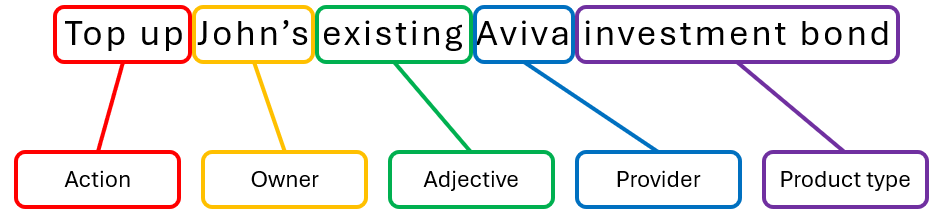
- Action – e.g. ‘Top-up’, ‘Switch’, ‘Increase the contributions’, etc. This will help to determine the report type.
- Owner - e.g. "his", "hers", "their", "Susan's" etc. This helps Gena identify the required plan.
- Adjective – e.g. ‘existing’ or ‘new’ (this determines whether to add a review section, or a recommendation section).
- Provider – This helps Gena identify the required plan.
- Product Type – This also helps Gena pinpoint the required plan and identify the relevant report section.
So – a very simple, but really good single advice scenario prompt might look something like this:
Whilst aiming for all five entities is good practice, it isn't mandatory. Some prompts may deliberately exclude one or more entities. For example:
Review all of John's existing investments
Initialisms, acronyms and abbreviations
Gena will always prefer to be given the full name for a provider or a product type. However, we accept that jargon, initialisms (e.g. 'VCT'), acronyms (e.g 'SIPP') and abbreviations are an accepted part of our profession. Gena has been trained on many of these such as:
- Scot Eq, Pru, L&G, Std Life.....
- ISA, GIA, FAD, UFPLS, VCT, EIS, OEIC, TIP, DB, DC, FSAVC, SSAS, SIPP, DFM, ESG, CIP, LTA, DTA, FIB, CIC
and many more...
That said, there are limits. If you're using Genovo's speech to text feature, it may struggle with "UffPlus", "Oik", "Qurops" or similar.
Multiple-scenario / multiple-action prompts
The simpler the prompt, the better chance Gena will have to identify the required entities and correctly select the report type, sections and plans. However, advice scenarios aren’t always that simple, and sometimes there may be:
- Multiple actions on a single plan
- “Top up his existing Transact ISA and then rebalance the model portfolio”
- Single actions on multiple plans
- “Increase the regular contributions to John’s existing Aviva SIPP and Jane’s existing Aegon PPP”
- Multiple actions on multiple plans
- “Top up John’s and Jane’s Transact ISAs, then switch the underlying investments of both plans, and take out a new Transact GIA in joint names”
Gena should handle all the above. However, the key is to try to ensure that each advice scenario contains as many as possible of the required five entities.
Gena's Golden Rules
These hints and tips will help you get good results when using the Gena report creation method:
- Your prompt should cover any existing or new plan(s) you are looking to include in this report and what action you are looking to take with them.
- It is best to use the full name for the product type – for example, simply using “pension” in the prompt when the plan is recorded as a Group Personal Pension may result in the incorrect plan being imported.
- If using speech to text, speak clearly and deliberately, as though you were talking in technical terms to someone for whom English is not their first language. Check the prompt and make any edits before clicking 'next step'.
- Be complete – “Top up his ISA” may work, but “Top up John’s existing Transact stocks & shares ISA” will definitely work.
- Be concise - Gena (currently) does not need to know information such as contribution amounts, investment strategies, risk profiles or client objectives.
- Try to include as many as possible of the five entities in the prompt – Action, Owner, Adjective, Provider, Product type (remembering that if you don’t provide an adjective (existing, current, in force, new, proposed, draft, etc) then Gena will assume it’s an existing plan.